Head and Body elements (Head) (L021)
The Head of the document
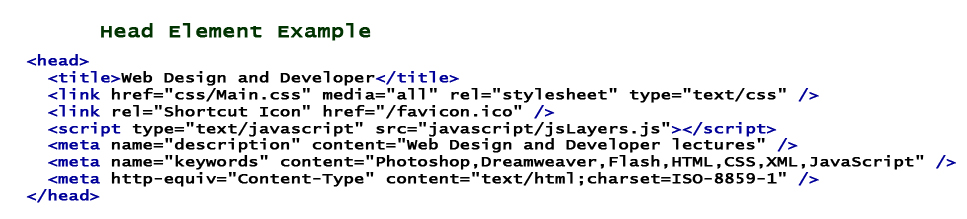
In your Head section you want to add several key elements. For example, it is here that you add a title to your document. But there are several additional elements that are generally added in the head section. It is best practice to add any style sheets or links to external css style sheets in the Head section. You will also add most of your scripts or links to external scripts here. Furthermore, andy meta data is generally placed in the Head section of the document.
The above example is for HTML v4, an XHTML example would include the following xml namespace:
<html xmlns="http://www.w3.org/1999/xhtml">
Head Elements
Title Element - no required attributes
<title></title>
- Used to define the title of the document as shown in the browser title bar.
- Used to define the title shown when a page is added to the user's favorites.
- Used by most search engines to display the page title in search results.
------------------------------------------------------------------------------------
Link Elements - Required Attributes: href, rel
- used to link to an external file, generally a style sheet
<link href="external file address" rel="relationship to the external file" media="target media" />
------- -- http://somefile123.css -- Only "stylesheet" is fully supported --- print / screen /all -
------- --<link href="../CSS/main.css" rel="stylesheet" media="screen"/>------------------------------------------------------------------------------------
Script Elements - Required Attributes: type (src for external file)
- used to define a client-side script, generally JavaScript
<script src="external file address" type="MIME-type"></script>
-http://somefile123.css - text/javascript-<= a MIME-Type "Multipurpose Internet Mail Extensions"
-------i------------------------ - a standard for describing different types of information (originally for email)
----- - -src is only used if calling an external file<script type="text/javascript" >
--------function sayHi()
--------{alert('hi');}
</script>------------------------------------------------------------------------------------
Style Elements - Required Attributes: type (optional: media - Specifies styles for different media types:screen, print,tty, handheld, all)
- used to define embedded client-side style
<style type="MIME-type" media="screen"></script>
------------- text/css------------------------------------------------------------------------------------
Meta Elements - varies (name / http-equiv, content)
- used to describe metadata
- Meta name
<meta name="name for the information" content="255 chars / 10 comma sep items" />
---------------description or keywords etc -------- GMU Web Design / HTML, CSS, JavaScript...Example: description and keywords
<meta name="description" content="GMU Web Lectures" />
<meta name="keywords" content="Photoshop, Flash, HTML, XHTML, CSS, JavaScript" />
-------------------------------------- SIDEBAR --------------------------------------
This is probably a good time to discuss: Search Engine Optimization (SEO).
Good SEO increases both the volume and the quality of traffic to a site.
Meta tags are often used by search engines to help categorize your page (highly debated). Depending who you speak to, Meta tags are either the key to good SEO practices, totally irrelevant, or somewhere in between. As a rule, it is probably best to err on the side of caution, and use them.Indexing with META tags - Below are those META tags most commonly use for optimizing sites with search engines.
- keywords - used to place keywords, relevant to the web site, in one place, to allow search engines to find and therefore cache the site appropriately.
- description - similar to KEYWORDS, DESCRIPTION allows the web site owner to summarize the purpose of the site
- robots - used to instruct a search engine spider to either allow or forbid caching the information on a page
Common Usage for the Robots and Revisit META Tag
The Robots META Tag is used for excluding content.A robots term of: "noindex" - allows the links on that page to be followed, but the page is not to be indexed.
<meta name="robots" content="noindex">A robots term of: "nofollow" - allows the page to be indexed, but no links from the page are followed.
<meta name="robots" content="nofollow">A robots terms of: "noindex, nofollow" - allows neither the page or the links on that page will be followed or indexed.
<meta name="robots" content="noindex, nofollow">Other SEO options:
-------------------------------------- End Sidebar -------------------------------
- xml sitemap
--- -<?xml version="1.0" encoding="UTF-8"?>
--- -<urlset xmlns="http://www.sitemaps.org/schemas/sitemap/0.9">
--- - --- -<url><loc>http://www.example.com/index.html</loc></url>
--- - --- -<url><loc>http://www.example.com/about.html</loc></url>
--- - --- -<url><loc>http://www.example.com/contact.html</loc></url>
--- - --- -<url><loc>http://www.example.com/etc.html</loc></url>
--- -</urlset>
Some Search Engines that allow Sitemap submission: Google, Yahoo!, Ask.com, Bing- A "robots.txt" file gives instructions to web robots.
It is placed in the root-level directory of your web server.
It looks like this:
- User-agent: *
- Disallow: /
It means:
- User-agent: * - --- - - - - - - - <= all robots
- Disallow: / - --- - - --- - - --- -<= don't visit any pages on the site.
- - variations:
- Disallow: - --- - - --- - -- - - - <= full visit rights
- Disallow: /tmp/ --- - - --- - - - <= don't visit any pages in the tmp folder
2. Meta http-equiv
<meta http-equiv="equivalent to HTTP headers" content="the value of the metainformation " />
--- --- -http-equiv tells the browser to pretend that an additional header was sent.
----- - -http-equiv is like adding an additional response line to the your HTTP Request/Response.A word about HTTP Headers and HTTP Request/Response:
HTTP - (Hypertext Transfer Protocol) is a protocol (agreed upon standard) that is used for retrieving hypertext documents.
It is the request/response standard used for the majority of Internet/Intranet packet transport. It is used in conjunction with other protocols such as TCP/IP. It is HTTP that built the World Wide Web.
All HTTP sessions are simply sequences of network request-response transactions. A client (browser) initiates a request via (TCP) connection to a particular port (i.e. port 80) on a host server. The HTTP server listening on that port waits for a client's request message. Upon receiving the request, the host server sends back (1) a confirmation message {handshake} and (2) the body of document, or an error message, or some other information.
-------
Want to see an http request/response?... go here
(http://web-sniffer.net/?url=http%3A%2F%2Fwebdevgmu.qsh.es&submit=Submit&http=1.1&gzip=yes&type=GET&uak=0)
Other important protocols: FTP, HTTPS, TCP/IP
--------------Example: no caching of page
-------<meta http-equiv="Cache-Control" content="no-cache" />
-------Example: Set the the encoded character set
-------<meta http-equiv="Content-Type" content="text/html; charset=utf-8" /> --
------------Above is the default character set for DreaweaverHTML documents are sent over the Internet as a sequence of bytes accompanied by encoding information
A message entity with a content type of "text/html" represents an HTML document.
A word about encoding:
In the beginning, there was ASCII (well maybe it was EBCDIC)- however when you pass information across the internet, ASCII can get sloppy. Encoding replaces the limited and/or unsafe ASCII characters in the packet.
Web sites use any one of the Unicode/ISO transformation formats (this allows multilingual encoding for languages). Commonly Web sites use UTF-8 or ISO-8859-1. These formats are able to represent any character in the Unicode standard, and are backwards compatible with ASCIIJust so you know... Dreamweaver encodes every single character not in the range 0 - 127 and thus equates the ISO-8859-1 character set with the us-ascii set
One more meta tag worth mentioning here; the refresh (redirect)
<meta http-equiv="refresh" content="5;URL=http://webdevgmu.qsh.es/new_directory/new_page.htm">
-----------in 5 seconds: go to the URL (if no url just refresh the page)